 English
 简体中文
简体中文
 Bahasa Melayu
The chips will be settled daily at 12:00 PM (GMT+8:00) and distributed to the chip wallet gradually after 3:00 PM (GMT+8:00) by the system.
Failure to receive the OTP verification code is usually related to the following three reasons:
1. The telecommunications network is unstable/maintained.
2. The current network environment is of poor quality.
3. The cellular network has not been refreshed for a long time.
To get the OTP verification code automatically:
📌 You can try restarting the phone
📌 Turn on Airplane Mode for 20 seconds, then turn it off to receive the OTP verification code normally.
If you are still unable to get the verification code, please contact our customer service for assistance.
After logging into platform, enter the LIONKING / 918KISS / MEGA88 game interface and click "Download".
• Open the platform and enter the game lobby (LIONKING / 918KISS / MEGA88).
• Tap Login, input your account & password, then confirm.
• If prompted, complete simple verification (e.g., OTP / CAPTCHA).
Draw windows are typically around 3:30 PM (GMT+8) and 7:30 PM (GMT+8).
Results will appear on the 4D Result page shortly after each draw.
Banks and payment channels may run daily maintenance / settlement during early hours.
If unavailable, try again later or use another top-up method/channel.
Delete the unselectable bank account, then add it again with correct details and OTP verification.
After “Success” is shown, re-apply for withdrawal.
Close the game/app, wait 2–3 minutes, then reopen.
If still stuck, clear cache, switch network (Wi-Fi ↔ Data), or contact support to force-logout the session.
• Ensure enough storage and stable network.
• Android: allow installs from unknown sources (trusted), then retry.
• iOS: use Safari to download, then Settings > General > VPN & Device Management to trust the profile if required.
Switch network (Wi-Fi/Data), close background apps, clear cache, and try again.
Persistent lag may be due to provider maintenance or your ISP routing—try later.
Go to the 4D Result page to view the latest winning numbers and your result status.
PUBLIC BANK may impose a short cooling period for risk control.
Wait for the countdown to end or try another channel/method to complete your top-up.
Go to Me > Security > Payment PIN, set a 6-digit PIN, and verify with OTP to activate.
Typical formula: Chips = Valid Turnover × Cashback Rate.
The rate depends on current promos/rules. Check the promotion details on the event page.
Open the game via the platform link in Safari or install the iOS package as instructed.
If a profile is required: Settings > General > VPN & Device Management > Trust the profile, then reopen.
Withdrawal limits vary by account/risk control. Check the Withdraw page for your quota.
The counter typically resets at system midnight (GMT+8).
Use Safari to download the iOS package. If prompted, go to
Settings > General > VPN & Device Management and Trust the profile, then reopen the app.
Try clearing cache, reopen with Safari/Chrome, or enable a DNS helper (e.g., 1.1.1.1).
You can also refer to the guide image:
Ensure your region and document info are correct and complete earlier KYC steps.
If fields remain disabled, refresh and try again or contact support.
Provider may be under maintenance or blocked by network routing.
Use the Newest URLs page, enable DNS helper (1.1.1.1), or try a different network/VPN (MY IP).
Some games display bet amounts in USD, but your wallet/chip credit is in MYR.
The system converts based on provider/display rules—this is normal behavior.
Look for the Interest FD label on supported game cards or check the product details page in the platform.
Interest is settled on a scheduled cycle by the system.
If your full Interest FD amount is in-game at calculation time, settlement may be deferred until funds return to wallet, then credited accordingly.
If the provider reports results later, the platform will credit after confirmation automatically.
Please allow some time for settlement to complete.
When withdrawing Interest FD products from games:
• If the withdrawn amount exceeds the original amount brought in, the winning difference is added to the cash wallet (Interest FD product amount remains unchanged).
• If you lose part of the amount in-game, the lost amount is deducted from the Interest FD product amount brought into the game.
1) DNS Solution
When you cannot access via local network, use 1.1.1.1 to log in to the platform.
 2) VPN Solution
When abroad and unable to access, use TunnelBear (or equivalent) to obtain a Malaysian IP, then access normally.

H1WINBOX Frequently Asked Questions (FAQs)
What time will the chips be released?
Daily chip settlement timing
WINBOX chips are settled daily at 12:00 PM (GMT+8:00) and gradually distributed to the chip wallet after 3:00 PM (GMT+8:00).
How the chip distribution works
The system calculates all eligible betting volume from the previous day and auto-credits the rebate into your chip wallet.
Failed to get the OTP verification code?
Common causes
OTP failure usually occurs due to:
1. Unstable or congested telecommunications network.
2. Poor current network environment.
3. Device network not refreshed for long periods.
How to fix OTP issues
Try the following:
✔ Restart your phone.
✔ Turn on Airplane Mode for 20 seconds and turn it off.
✔ Ensure SMS inbox is not full and your phone has signal.
If still not received, contact WINBOX customer service.
Additional tip
If you are using Dual SIM, set the primary SIM to the number registered in WINBOX for higher OTP success rate.
How to download LIONKING / 918KISS / MEGA88?
Game download guide
Log in to WINBOX → go to the respective game interface → click "Download" to install the game.
Device compatibility note
Ensure you are using Android for these apps, as iOS does not support installation.
How can I log in to LIONKING / 918KISS / MEGA88?
Login steps
These apps do not require ID or password. Steps:
1. Clear all running apps.
2. Reopen the mobile web version.
3. Select your game and press "Start Game".
Why no login credentials needed
These games authenticate through your WINBOX account token, not manual login.
What time will the 4D lottery be held at 3:30 PM and 7:30 PM?
Afternoon draw schedule
Results appear between 5:30 PM – 6:00 PM for the afternoon session.
Evening draw schedule
Results appear between 9:30 PM – 10:00 PM for the evening session.
Why is Instant Top-Up unavailable during early morning hours?
Daily system maintenance
Maintenance periods:
• 11:50 PM – 12:30 AM (General)
• 02:50 AM – 05:00 AM (Maybank)
Why maintenance is required
Banks run backend security checks, causing interruptions in instant deposit channels.
What should I do if I can’t select the grayed-out bank account for withdrawals?
Fixing bank selection issues
Delete your current saved bank account → re-add the same bank details → retry withdrawal.
Why this happens
System mismatch or expired verification may cause bank account unavailability.
What should I do if I am stuck in a game and cannot exit?
When the game freezes
Force close the game app → reopen WINBOX and reload the game.
Additional steps
Clear cache or switch network if the issue persists; contact customer service for forced logout.
What can I do if I can’t install the app on my phone?
Common installation failures
Clear phone cache → delete duplicate APK files → re-download using official link.
Extra note
Enable "Install unknown apps" if prompted by Android security.
What should I do if I experience lag while playing the game?
General fixes
Switch to stable Wi-Fi/mobile data → clear background apps → restart game.
Why lag occurs
Device RAM overload or unstable internet typically causes in-game delay.
Where can I check my 4D winning score?
EKOR STRIKE Checking
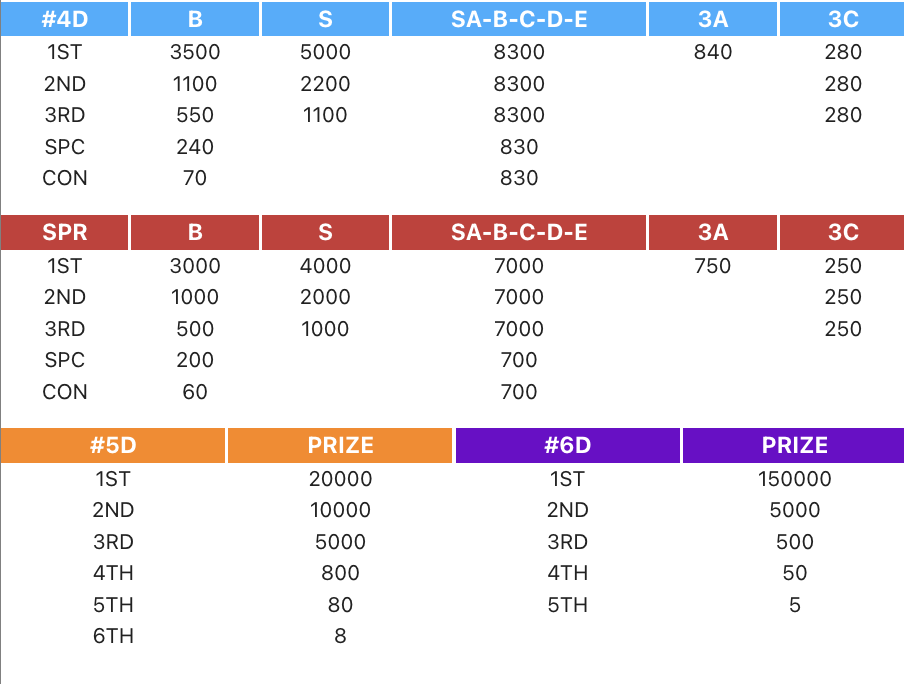
To check your 4D winning score, simply open EKOR and tap on the "STRIKE" button. You will be able to view your results instantly, including 1ST, 2ND, 3RD, Special (SPC), and Consolation (CON) categories.
4D Prize Structure Overview
4D prizes are based on the following payout structure:
1ST: B 3500 / S 5000 / SA-B-C-D-E 8300 / 3A 840 / 3C 280
2ND: 1100 / 2200 / 8300 / 280
3RD: 550 / 1100 / 8300 / 280
SPC: 240 / 830
CON: 70 / 830
4D SPR Prize Structure
SPR payout categories include:
1ST: B 3000 / S 4000 / SA-B-C-D-E 7000 / 3A 750 / 3C 250
2ND: 1000 / 2000 / 7000 / 250
3RD: 500 / 1000 / 7000 / 250
SPC: 200 / 700
CON: 60 / 700
5D Prize Structure
The 5D payout structure is:
1ST – 20,000
2ND – 10,000
3RD – 5,000
4TH – 800
5TH – 80
6TH – 8
6D Prize Structure
The 6D winning payouts are:
1ST – 150,000
2ND – 5,000
3RD – 500
4TH – 50
5TH – 5
Why do I keep encountering a "Transaction Cooling Period" when topping up with PUBLIC BANK?
Reason for delayed approval
Public Bank introduced this system on June 22, 2023. Random transactions may take up to 3 business days to review.
How to continue topping up
Wait for approval → contact customer service → resume top-up after the bank clears your transfer.
How do I set up a payment PIN?
Step-by-step PIN setup
To set your payment PIN:
1. Go to "My"
2. Select "Settings"
3. Click "Reset Payment PIN"
4. Enter a new PIN and confirm it.
PIN safety tips
Avoid using simple numbers such as 111111 or birth dates. Never share your PIN with anyone.
How do I calculate the cashback (chips) on my bets?
Cashback formula
Cashback = Total betting volume × Rebate rate.
Example:
• Daily betting volume: RM 10,000
• Rebate: 1.0%
• Cashback received: RM 100
When cashback is credited
Cashback is converted into chips and distributed automatically during daily chip settlement.
How do iOS devices (iPhone & iPad) play LIONKING / 918KISS / MEGA888?
Why iOS cannot run these games
These games are Android-only due to vendor restrictions. iOS does not support the required installation files.
Recommended solution
Use an Android device for these games, or play other iOS-compatible games through the WINBOX web version.
How many times can users withdraw funds in a day?
Daily limit rules
Users can withdraw up to 3 times per day. The limit resets at 12:00 PM (GMT+8) daily.
Allowed withdrawal window
Withdrawal time: 12:00 PM (GMT+8) → 11:59:59 AM (next day).
How do I install the WINBOX app on iOS?
iOS app download status
iOS does not support direct WINBOX app installation. Only the web version is available.
Workaround
Add the WINBOX web version to your Home Screen for faster access.
What should I do if the 918KISS download page shows a white screen?
Common Cause
A white screen usually occurs when the network routing is unstable, blocked by ISP filtering, or when Cloudflare protection prevents the page from loading properly.
How to Fix It (Android Tutorial)
Follow the official step-by-step solution to resolve the issue.
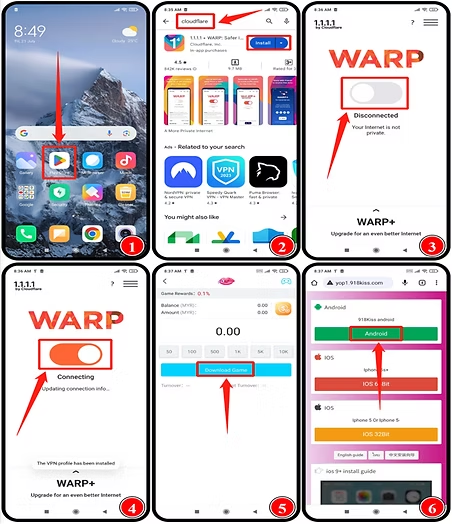
Step 1 – Open Google Play Store
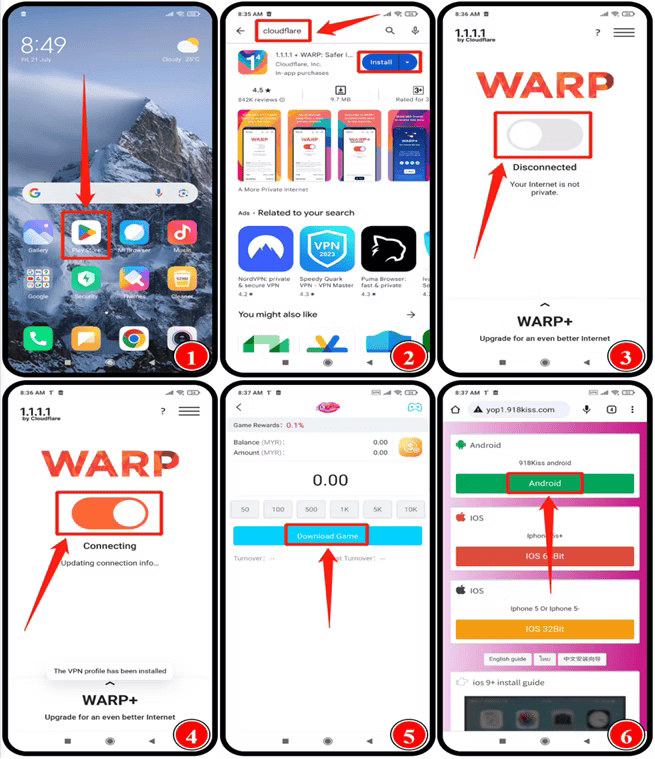
Go to your phone’s app list and open the Google Play Store. Search for "Cloudflare 1.1.1.1".
Step 2 – Install Cloudflare WARP
Once the app appears, tap "Install" to download and prepare the WARP connection tool.
Step 3 – Open the App and Turn On WARP
Launch the 1.1.1.1 WARP app and switch the toggle button ON. The status may show "Disconnected" initially—this is normal.
Step 4 – Wait for "Connecting" → "Connected"
The app will automatically configure your secure connection. Wait until it reaches "Connected". This stabilizes routing to 918KISS.
Step 5 – Return to the 918KISS Page
Go back to the WINBOX platform and press "Download Game" again. The page should load normally without turning white.
Step 6 – Select Android Download Link
After the page loads, tap the green "Android" button to begin downloading the 918KISS APK successfully.
Why can’t I select "Currency" or "Bank" during Identity Verification?
Supported currencies
Identity Verification only supports MYR and THB. USD is not supported.
How to add currency
Go to "ME" → wallet → "+" to add supported currencies.
I cannot access PLAYTECH—What should I do?
Android Fix – Step-by-Step Guide
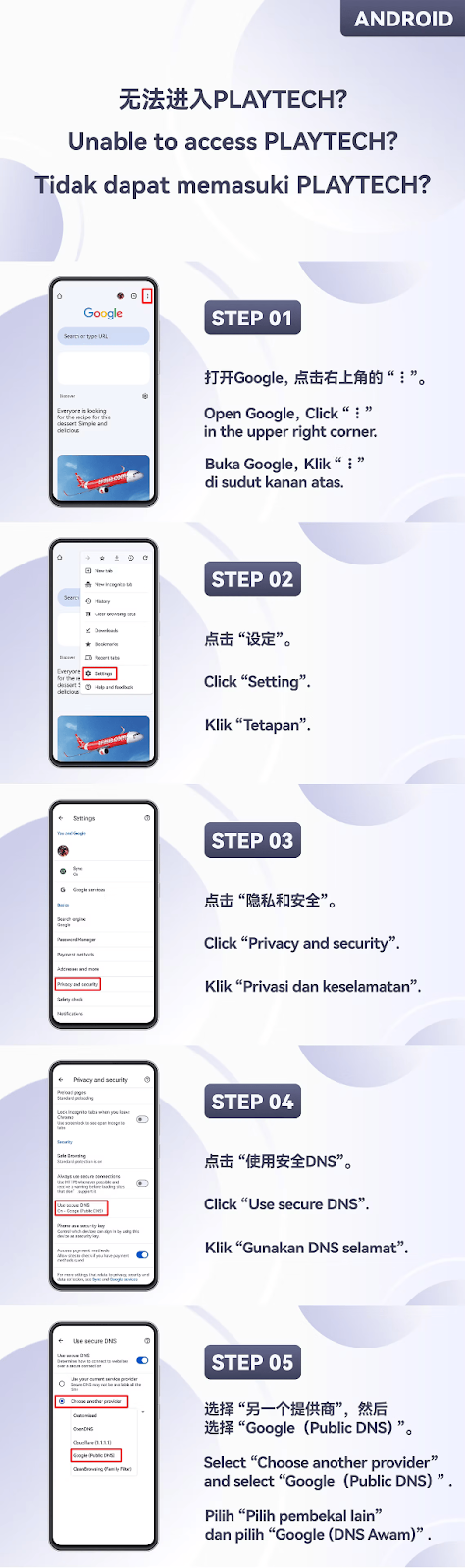
Follow the steps below to resolve PLAYTECH access issues on Android devices.
Step 1 – Open Google App
Open the Google app on your Android device and tap the "⋮" icon located at the top-right corner of the screen.
Step 2 – Enter Google Settings
Tap "Settings" from the menu to access the Google app settings page.
Step 3 – Open Privacy and Security
Scroll through the settings and tap "Privacy and Security".
Step 4 – Enable Secure DNS
Tap "Use Secure DNS" to enter DNS configuration settings.
Step 5 – Select Google Public DNS
Choose "Choose another provider" and select "Google (Public DNS)" to apply the new DNS settings.
iOS Fix – Step-by-Step Guide
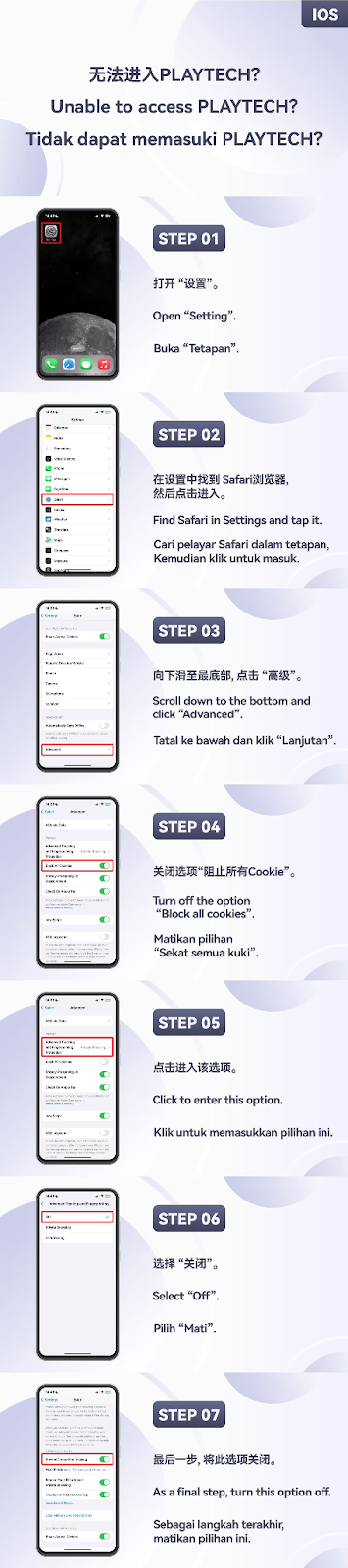
If you cannot access PLAYTECH on iPhone or iPad, follow the steps below.
Step 1 – Open Settings
On your iOS device, open the "Settings" app.
Step 2 – Go to Safari
Scroll through the settings list, locate "Safari", and tap it.
Step 3 – Enter Advanced Settings
Scroll to the bottom of the Safari settings page and tap "Advanced".
Step 4 – Disable "Block All Cookies"
Turn off the toggle for "Block All Cookies" to allow Safari to load PLAYTECH properly.
Step 5 – Open Additional Safari Options
Tap the option shown on your screen (Website Data or Privacy options) to continue the configuration.
Step 6 – Turn Off Fraudulent Website Warning
Tap the setting and switch off "Fraudulent Website Warning" to ensure PLAYTECH loads without restrictions.
Step 7 – Final Step to Complete Fix
Perform the final adjustment shown in the tutorial images to complete the PLAYTECH access fix.
H1WINBOX Frequently Asked Questions (FAQs)
Why do players bet in USD but receive chips in MYR?
Unified WINBOX Settlement Currency
WINBOX uses MYR as the universal settlement currency for chips. Even if lower-level players bet in USD, all chips will be settled in MYR by the system.
Why MYR?
The MYR chip system ensures consistent rebate calculation, easier settlement processing, and a stable conversion structure for the WINBOX platform.
Does this affect player rewards?
No. The rebate calculation remains accurate and fair, as the system converts all volumes internally before issuing chip rewards.
Which WINBOX games support Interest FD settlement?
Supported Game Categories
Interest FD settlement is supported in the following game types:
• SLOTS • LIVE • SPORTS • FISHING • FAST GAMES
Why only these game types?
These categories provide stable betting volumes, allowing the WINBOX system to calculate Interest FD settlements accurately.
Are other categories supported in the future?
WINBOX may add more supported game categories depending on system updates and settlement stability.
When is interest settled, and what if you are still inside the game?
Daily Settlement Time
Interest is settled daily at 3:00 PM (GMT+8) by the WINBOX system.
What if I am still inside the game?
The system will settle your interest in the background, even if you remain inside the game. No interruption will occur.
Do I need to exit the game manually?
No. Settlement is automatic. Exiting the game is not required for the interest to be calculated.
How does the system settle Interest FD when I exit the game?
Post-Game Settlement Logic
Once you leave the game, the system will process your Interest FD settlement in the background.
Will settlement be delayed?
Processing time may vary depending on the system queue, but interest will always be credited accurately.
Do I receive notification?
Settlement may not generate a pop-up, but you can check the updated Interest FD balance in your wallet.
Why does the purchased amount change when I try to withdraw my Interest FD?
System-Updated Amount Display
The amount shown during withdrawal reflects the latest system-updated FD product value, which may differ from the original displayed amount.
Why does it change?
Updates may occur due to product adjustments, internal recalculations, or system synchronization with settlement records.
Does this affect my actual payout?
No. Your final settlement amount remains accurately calculated based on WINBOX Interest FD rules.
What should I do if I cannot access the WINBOX platform or games?
Common Causes of Inaccessibility
Access issues may occur due to unstable network routing, ISP restrictions, DNS conflicts, or device security settings blocking platform access.
Recommended Fix: Use Cloudflare Warp (1.1.1.1)

Enabling Cloudflare Warp (1.1.1.1 DNS) improves routing stability and bypasses network congestion, helping you connect smoothly to WINBOX games and services.
Steps to Enable 1.1.1.1 DNS / Warp
1. Install the Cloudflare 1.1.1.1 app.
2. Open the app and enable all required permissions.
3. Switch on the "Warp" or "1.1.1.1" connection mode.
4. Return to WINBOX and refresh the platform page or game.
Will using DNS or VPN affect gameplay?
No. Using DNS or Warp only improves your internet pathway and does not affect gameplay, betting data, or WINBOX system accuracy.
Alternative Fix: Use TunnelBear VPN

If you are overseas or using a restricted network, connect via TunnelBear VPN to obtain a stable Malaysian IP address and access WINBOX normally.
Need More Help with WINBOX?
Explore more tutorials, troubleshooting guides, and detailed step-by-step instructions through the WINBOX Help Center to enjoy a smoother gaming and platform experience.